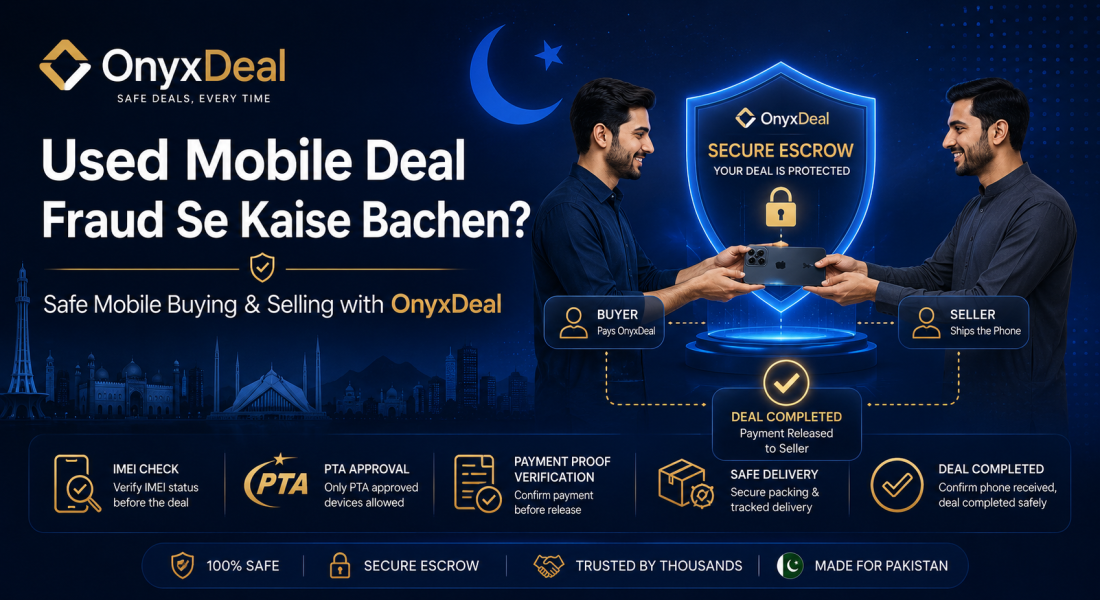
Used Mobile Phone Deal Karte Waqt Fraud Se Kaise Bachen?
Used mobile phone buy ya sell karte waqt IMEI, PTA status, battery health, payment proof, delivery proof aur secure deal process check karna zaroori hai. OnyxDeal mobile phone deals ko safer aur more organized banane men help karta hai.
Used Mobile Phone Deal Karte Waqt Fraud Se Kaise Bachen?
Pakistan men used mobile phone ki buying aur selling bohat common hai. Log OLX, Facebook Marketplace, WhatsApp groups, Instagram pages, aur local dealers ke through mobile phones buy aur sell karte hain.
Lekin used mobile phone deals men fraud ka risk bhi zyada hota hai. Kabhi seller phone ki condition hide karta hai, kabhi IMEI ya PTA status clear nahi hota, kabhi battery health ya repair history mention nahi hoti, aur kabhi fake payment screenshot ke through seller ko fraud ka risk hota hai.
Is liye used mobile phone deal karte waqt proper safety process follow karna zaroori hai.
Used Mobile Phone Deals Men Common Fraud Types
Used mobile phone deals men ye fraud types common ho sakte hain:
1. Fake Seller Fraud
Seller mobile phone ki fake images ya fake details show karta hai aur advance payment lene ke baad disappear ho jata hai.
2. Wrong Phone Delivery
Listing men ek phone show hota hai, lekin delivery men different model ya damaged phone milta hai.
3. Non-PTA Phone Scam
Seller PTA approved phone bolta hai, lekin baad men phone non-PTA ya blocked nikalta hai.
4. IMEI Issue
Phone ka IMEI mismatch, blocked, cloned, ya suspicious ho sakta hai.
5. Battery Health Hide Karna
Seller battery health ya battery issue hide karta hai.
6. Repaired Phone Original Batana
Phone repaired hota hai, display change hoti hai, ya water damage hota hai lekin seller original condition claim karta hai.
7. Fake Payment Screenshot
Buyer fake payment proof bhej kar seller se phone deliver karwane ki koshish kar sakta hai.
8. Advance Payment Scam
Seller advance payment mangta hai aur payment receive karne ke baad phone deliver nahi karta.
Used Mobile Buy Karne Se Pehle Kya Check Karein?
Agar aap used mobile phone buy kar rahe hain to deal confirm karne se pehle ye cheezen zaroor check karein:
1. Phone model
2. Storage variant
3. Color
4. PTA status
5. IMEI number
6. Battery health
7. Display condition
8. Camera condition
9. Speaker aur mic
10. Charging port
11. Face ID / Fingerprint
12. Box aur accessories
13. Repair history
14. Water damage signs
15. Final price
16. Delivery method
17. Payment proof
Buyer Ke Liye Mobile Deal Safety Tips
Agar aap buyer hain to ye steps follow karein:
Step 1: Real Images Aur Video Mangain
Seller se fresh images aur video mangain. Video men seller phone ko on karke show kare:
1. About phone screen
2. IMEI screen
3. Battery health
4. Camera test
5. Display test
6. Charging test
7. Accessories
Step 2: IMEI Verify Karein
Phone ka IMEI number check karein. IMEI dial karne ke liye:
*#06#
Phir IMEI ko phone box aur settings ke sath match karein. Agar IMEI mismatch ho to deal avoid karein.
Step 3: PTA Status Check Karein
Pakistan men mobile phone buy karte waqt PTA status bohat important hai. Seller se PTA approval proof ya screenshot mangain. Phone non-PTA hai to price aur usage limitations clearly samajh kar deal karein.
Step 4: Battery Health Check Karein
iPhone deal men battery health check karein. Android phone men battery backup, charging speed, aur heating issue check karein.
Step 5: Display Aur Touch Test Karein
Display men green line, dead pixels, touch issue, brightness issue, ya shadow/burn-in check karein.
Step 6: Camera, Speaker, Mic Test Karein
Camera open karke photo/video test karein. Speaker, mic, earpiece, vibration, Bluetooth, Wi-Fi, SIM signals, aur hotspot bhi check karein.
Step 7: Price Too Good To Be True Ho To Careful Ho Jaen
Agar phone market price se bohat zyada cheap ho to suspicious ho sakta hai.
Step 8: Payment Proof Save Karein
Payment karne ke baad transaction ID, screenshot, bank/JazzCash/EasyPaisa proof save karein.
Step 9: OnyxDeal Secure Process Use Karein
High-value mobile deal ke liye OnyxDeal ke through deal process use karein. Buyer deal details review karta hai, payment proof upload karta hai, OnyxDeal verification karta hai, seller delivery karta hai, aur buyer delivery confirm karta hai.
Buyer complete guide ke liye visit karein:
https://onyxdeal.com/for-buyers
Seller Ke Liye Mobile Deal Safety Tips
Agar aap mobile phone sell kar rahe hain to ye steps follow karein:
Step 1: Product Details Clear Likhein
Listing ya deal men ye details clear mention karein:
1. Phone model
2. Storage
3. Color
4. PTA status
5. Battery health
6. Condition
7. Accessories
8. Box available hai ya nahi
9. Repair history
10. Final price
Step 2: Buyer Se Deal Terms Confirm Karein
Buyer ke sath price, delivery method, payment method, aur delivery time clear karein.
Step 3: Fake Payment Screenshots Se Bachain
Payment proof verify kiye bina phone deliver na karein. Fake screenshots common fraud method hain.
Step 4: Delivery Proof Save Karein
Courier receipt, tracking number, handover video, buyer confirmation screenshot, aur chat record save rakhein.
Step 5: OnyxDeal Par Deal Create Karein
Seller OnyxDeal par deal create kare, buyer ko deal link/code share kare, buyer deal accept kare, payment proof upload kare, phir verification ke baad seller delivery kare.
Seller complete guide ke liye visit karein:
https://onyxdeal.com/for-sellers
OnyxDeal Used Mobile Deals Ko Safe Kaise Banata Hai?
OnyxDeal buyer aur seller ke beech ek clear process create karta hai:
1. Buyer aur seller deal terms agree karte hain
2. Seller OnyxDeal par deal create karta hai
3. Buyer deal details review karta hai
4. Buyer deal accept karta hai
5. Buyer payment proof upload karta hai
6. OnyxDeal payment proof verify karta hai
7. Seller mobile phone deliver karta hai
8. Buyer phone receive karke check karta hai
9. Buyer delivery confirm karta hai
10. Deal complete ho jati hai
Complete process ke liye visit karein:
https://onyxdeal.com/how-it-works
Used iPhone Deal Men Extra Checks
Agar aap used iPhone buy kar rahe hain to ye checks zaroor karein:
1. iCloud lock off hai ya nahi
2. Face ID working hai ya nahi
3. True Tone available hai ya nahi
4. Battery health percentage
5. Display original hai ya changed
6. Camera working
7. Speaker aur mic working
8. PTA approved ya non-PTA status
9. Box IMEI match
10. Repair history
Used Android Phone Deal Men Extra Checks
Android phone buy karte waqt ye checks karein:
1. IMEI status
2. PTA approval
3. Display touch test
4. Fingerprint/Face unlock
5. Charging port
6. Battery backup
7. Heating issue
8. Camera and video test
9. SIM signals
10. Software condition
Mobile Deal Red Flags
Agar ye signs nazar aayen to deal avoid karna better hai:
1. Seller real video dene se avoid kare
2. Price market se bohat low ho
3. Seller advance payment force kare
4. IMEI share na kare
5. PTA status clear na ho
6. Battery health hide kare
7. Buyer fake urgency create kare
8. Payment screenshot blurry ya edited lage
9. Seller ya buyer details baar baar change kare
10. Delivery proof dene se avoid kiya jaye
OnyxDeal Fees
OnyxDeal successful deals par simple 2% service fee charge karta hai.
Example:
Agar mobile deal amount PKR 50,000 hai, to 2% service fee PKR 1,000 hogi.
Agar mobile deal amount PKR 100,000 hai, to 2% service fee PKR 2,000 hogi.
Fees details ke liye visit karein:
https://onyxdeal.com/fees
Final Words
Used mobile phone deal karte waqt fraud se bachne ke liye buyer aur seller dono ko proper verification, payment proof, delivery proof, aur written deal record maintain karna chahiye.
OnyxDeal Pakistan men mobile phone deals ko safer aur more organized banane ke liye secure deal process provide karta hai. Agar aap OLX, Facebook Marketplace, WhatsApp, Instagram, ya kisi bhi platform par used mobile phone buy ya sell kar rahe hain, to OnyxDeal ke through deal karna zyada safe option ho sakta hai.
Recent Blogs
-
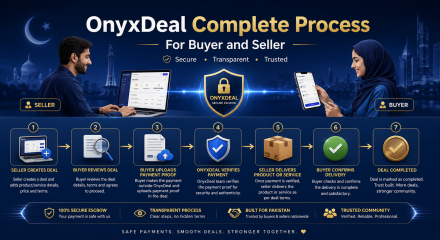
OnyxDeal Ka Complete Process for Buyer and Seller
May 23, 2026 -

How to Buy Online Safely in Pakistan
May 23, 2026 -
Why Escrow Protection Helps Buyers and Sellers
May 23, 2026 -

How to Buy Online Safely with Onyxdeal
May 23, 2026